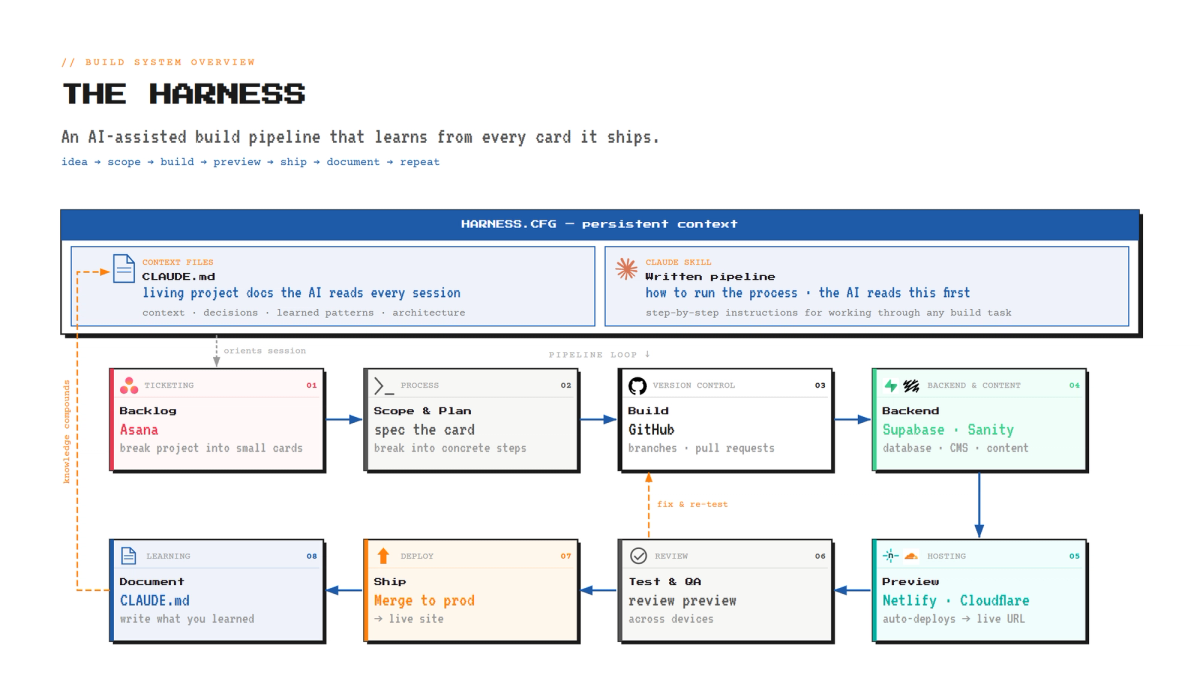
I'm a skeptic of AI hype (see “The AI Con“ By Emily M. Bender & Alex Hanna) and here's the part that took me a while to internalize: the barrier to shipping production-quality code has never been lower, but where programming languages demand syntax, this demands methodology. When producing code stops being the bottleneck, the constraint moves to everything around it: deciding what to build, scoping it properly, testing it, and not losing the plot across dozens of features. The tools are incredible. The discipline is now the differentiator.
That's what this post is actually about, not the magic of the models, but the workspace I built around it so the magic is repeatable.
The workspace, a.k.a. the harness
I think of my setup less as "a chat window" and more as a harness: a structured environment where an idea can go from a sentence in my head to a live feature on a real website, with checkpoints along the way.
A few pieces make it work:
- Persistent instructions and context — the real heart of it. Two kinds of memory the AI reads fresh at the start of every session.
- First, a skill that spells out the pipeline: the pipeline itself — scope, prove, build, QA, document — written down as standing instructions, so the process doesn't live in my head.
- Second, a set of context files (markdown docs like CLAUDE.md) that describe the project: the stack, the conventions, what's already shipped and why. Open a brand-new session and it reads these first, so it shows up already understanding the codebase — as if it had been on the team the whole time, instead of meeting the project for the first time.
- Connected tools A GitHub connection so code, branches, and pull requests are frictionless. Hosting through platforms like Netlify and Cloudflare so every change gets a live preview URL automatically.
- A ticketing system as the backbone. This is the part I think people skip, and it's the part that makes everything else hold together.
The single most helpful decision I made was to manage features through a ticketing system — I use Asana (because its free version has enough features and has a MCP for Claude) — instead of just riffing in a chat until something breaks. Every idea becomes a card. The cards sit in a backlog. And then, crucially, I process them one at a time. If something unexpected surfaces while implementing, Claude creates a new card instead of inflating the current one's scope. The skill's instructions keep it disciplined.
The Pipeline: One idea, all the way through
Each card runs through the same pipeline before it's considered done:
- Scope it. Before any code, the idea gets written up as a small spec — the problem, what "done" looks like, what it depends on, and any open questions. This is where I catch the "wait, what do I actually mean by that?" problems while they're still free to fix.
- Mock it up / prove it out. A small proof of concept or a quick mockup — the smallest thing that shows the approach actually works. For a website that's usually a simplified HTML page I can look at; for a backend piece it's one real round-trip to verify the data.
- Implement it. Now the production version, built to the conventions the codebase already follows.
- Launch a preview. Every change deploys to its own preview URL automatically. Nothing touches the live site yet. (depends on the hosting solution on how this is setup)
- QA on desktop and mobile. Test layout, responsiveness, interactions, edge cases
- Give feedback until it's right. Bugs get fixed on the same branch, the preview rebuilds, I re-check. Loop until it's genuinely good — not just "the build passed," but "this meets my original requirements."
- Document it. Once it ships, the knowledge of why and how gets written back into the project's own docs, so the next feature starts from a smarter baseline.
That last step is the quiet superpower. Most one-off AI coding sessions are amnesiac — they forget everything the moment you close the tab. By forcing every shipped feature to leave behind documentation, the codebase's knowledge of itself compounds. Each new feature is easier to build than the last, because the context is already there waiting.
The other rule I hold to: one card, one feature, one session. The fastest way to create a tangled, un-debuggable mess is to bundle five half-finished ideas into one sprawling session. Keeping each piece of work isolated is boring and it is exactly why things don't fall apart. If you need to, start a session just to break a feature down into multiple cards first.
I've now built this three times (once for real work applications)
This didn't start with my website. It started with Project mixtape — a.k.a. Playlist Bot — a collaborative-playlist automation I built as a side project. That's where I first set up the pipeline: a backlog of features flowing through scope → proof → implement → QA → document, each one shipped on its own.
When I rebuilt ddbbll.me, migrating off Squarespace, I brought the exact same harness with me. New project, same machine. The discipline travels.
And here's the thing I keep coming back to: I've used this same approach to build internal tools at companies I've worked for. Once you have a repeatable way to turn "we need a thing that does X" into a shipped, tested, documented tool, you stop being limited by whether someone will staff an engineer to your problem.
Try it yourself!
It’s worked so well for what I needed, I decided to create a skill that will help you get started building a pipeline of your own!
Get it here: https://github.com/dannylamberson/HarnessOnboarding
The actual unlock: filling the gap
This is the part I think matters most, beyond my own little projects.
Most teams run on platforms that fit most of what they need. Your CRM, your project management tools, whatever your day-to-day runs on — call it an 80% fit. The platform nails the common case. But there's always that last 20%: the report it won't generate the way you need, the workflow it can't quite model, the feature request you file that will never get built because you're one customer among thousands. So you end up doing weird manual workarounds to bridge the gap.
That 20% is exactly where this kind of lightweight custom solution shines. You're not trying to replace the CRM. You're filling the specific gap for your business's needs.
Historically, closing that gap meant pulling in a software engineer — a real cost, a real wait, a real "is this worth a ticket on someone's roadmap?" conversation. Now the constraint isn't capacity, it's structure. It's having the structure to use these tools like a product owner and a development team would — which is the whole point of the harness.
The tools got remarkable. But a remarkable tool with no process is just a faster way to make a mess. Put real structure around it—backlog discipline, one-at-a-time focus, QA, compounding docs—and you ship like a team.
That's the workspace. That's the unlock.
An aside: The Evolution of Software
If you zoom all the way out, the history of programming is one long story about removing the distance between a human idea and a machine doing the thing.
It started about as far from "human" as you can get. People fed computers stacks of punch cards, physical sheets with holes in them, and the machine read the holes as instructions. This was the first barrier removed from someone needing to also be an electrical engineer to create autonomous machines.
After that came machine code and assembly: writing in the actual dialect the processor speaks, registers and memory addresses and all. I took an intro course in x86 assembly language about 12 years ago. I'm no expert but I still don't fully understand how someone like Chris Sawyer built RollerCoaster Tycoon, a genuinely complex, beloved game, almost entirely in x86 assembly.
Then things got more human. Higher-level languages let you write closer to English; compilers translate to machine code. IDEs gave us a place to write, compile, debug, and test all in one spot. Each step in that chain did the same thing: it abstracted away the layer below it, so you could spend your attention on the idea instead of the plumbing.
We're now living through the next step in that chain. With large language models, you're abstracted all the way up, from machine code, to syntax, to plain human language. You describe what you want, in the same words you'd use to explain it to a coworker, and the model predicts the code to make it real, front-end and back-end alike.